Asset request
An Asset request is a general-purpose structure that references an image asset.
The Asset Request JSON schema defines its structure.
Asset requests point to an image asset. The asset can be either:
- A bundled asset included in the downloaded theme.
- A URL with optional light and dark variants.
- A Base64-encoded JPEG or PNG image embedded directly in the request.
- A Color request.
Common properties
All image request variants support a set of common properties.
Warning
Common properties apply to every Asset request variant except the color variant.
All the common properties are optional.
fit
Controls how the image fits within its container:
fill: default. Fills the container and might stretch the image.contain: fits the image inside the container while preserving its aspect ratio. The area behind the image might be visible and can be set withbackground.cover: covers the container while preserving the image's aspect ratio. The image might be cropped.
background
An optional Color request that sets the background color behind a contained image.
subImage
Specifies a rectangular region of the original asset. It contains the x, y, width, and height properties, all measured in pixels. For example:
This request references a specific region of the my_image image.
tint
When set, this property applies the specified color to every non-transparent part of the image. Its value is a Color request.
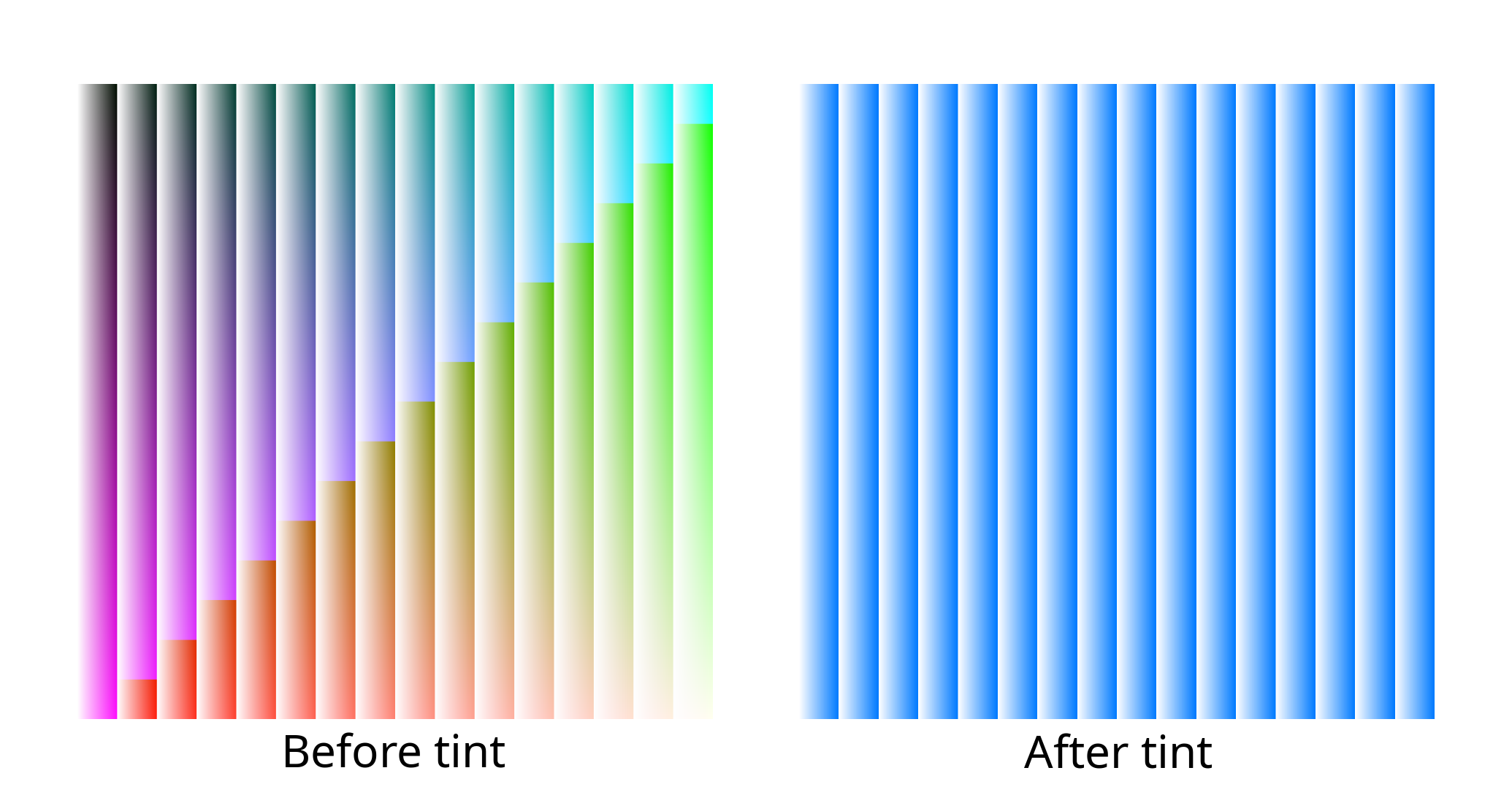
Common properties example
{
  "asset": "my_image",
  "fit": "contain",
  "background": "#aabbcc",
  "subImage": {
    "x": 64,
    "y": 128,
    "width": 16,
    "height": 16
  },
  "tint": "#aabbcc"
}
Platform split
An Asset request can resolve to different assets depending on the current platform.
Supported platform keys are:
shared: fallback for platforms that cannot otherwise resolve an asset.desktop: Windows or macOS.mobile: iOS or Android.win: Windows only.mac: macOS only.ios: iOS only.android: Android only.
If no platform is specified, the request is assumed to apply to all platforms. If the current platform is not specified, the request fails to resolve.
For example:
{
  "android": {
    "light": {
      "asset": "android_light_image"
    },
    "dark": {
      "asset": "android_dark_image"
    }
  },
  "desktop": "main_icon_image"
}
This Asset request resolves on Android and desktop platforms. It does not resolve on iOS.
Platform fallbacks
If `android` or `ios` is omitted but `mobile` is present, the system uses the `mobile` asset for the omitted platform. If `win` or `mac` is omitted but `desktop` is present, the system uses the `desktop` asset for the omitted platform. If none of `android`, `ios`, and `mobile` are present but `shared` is, mobile platforms use the `shared` definition. If none of `win`, `mac`, and `desktop` are present but `shared` is, desktop platforms use the `shared` definition. If no platform specializations are provided, all platforms use the same assets. If `android`, `ios`, and `mobile` are specified, the `mobile` section is ignored. If `win`, `mac`, and `desktop` are specified, the `desktop` section is ignored.Light and dark modes
All options support specifying either light or dark mode. This is a top-level property:
This allows you to specify completely different assets for light and dark modes.
To use theme-specific assets, specify both light and dark. Otherwise, define the asset properties directly:
The remaining examples use the direct form unless stated otherwise.
Bundled theme assets
An asset bundled with the app has a unique ID that matches the regular expression ^[A-Za-z0-9_.-]+$.
A string can reference a bundled asset:
To apply common properties, use the object form:
URL assets
Assets can also be downloaded on demand. The host must not require authentication and should return correct Content-Type and Content-Length headers.
Base64-embedded assets
An image can be embedded directly in the request. The supported formats are png and jpeg; specify the format in the type property.
This mode does not currently support compression.
{
  "base64": {
    "bytes": "iVBORw0KGgoAAAANSUhEUgAAABAAAAAQCAIAAACQkWg2AAADIElEQVR4nAAQA+/8BBUca3pWignGt9UubREhTt8ReU0RKSNZsjU278EP1Xth1D5hwPD8HOezEa7cNB82fgBHpXzowlwNPG7lXblyzHSJPiVXkpHn2PdBJAUqUCaaAiEpIgmp+TPJhfT2OliK/iQAZrc+xRpKV/HqdgQokOER7BGBXVTCCfm84dz9cgLFqWY5hBVLo9YqQgZ/qNhwbB3kA4iiacwcL8+fa1H9FLLyUJSS2Xea+zjiAMxRdxrhrynNhc4xSZMNKlbVqEYuVH0OMwAEdsaW+PusChARyvs5NEIkWyHeW3iaPvJAGmHvH3wx7rHe3UktIwRMN9g+DUgDNrAC2jPH/XVIWRi9bPWoaHWHBhlvOuAZKmNEfcCv4gfcuFRWI+zsHqXP3LvQ6SthvoPKABYJ1rjk2ySZObo39jtILWMUEXo9EnMmmppDDNHKNm81avRKHwQCcDbycuY3Yy8Y+QDe2m52TLW0blfPWQa7Kl8oyPAF01xT/BPyPlSV3Vy3ENxeDO9jVpXtr5AoCC0zW8gDmf903MD618T+HP2CVyzRZHrzsfYSOE42zZfo/0u73TFjBNIEeJp+kr98f+CyO9YZAKg0zPnUex/mmrmmDTFAQ+KLtmahLv5IjcHNaGeywwHGnxS/Mo66AgsOF7kAW/UGcgTHl7mXjBbli6IItXlaWplSdmawmJ+jBY309zwdT/y41EpxU/IH5lTh7huidRaP80IApOAZcqXKODo57IZR1X36sYpQsDEUHcMvm40f9T8IFMBja/uAuUrg96Ds79Q7Vw+xA1xShhmRZGixLdzgYf7a4LHzDmstCc+fDJvR/Fu4ONuwp851dfF/5PA60lNJqx3dwQJC/AKoNPmPgpYc9VDM4getFryh2oKLluuwSfLypM4C+5WjdBhidwuQ/wZFm5l9mkgDNsimp8TPujPB7b7mtGL6Cz+rXZ/9x9bSvbnV+l3WfBagZ2HuntcIeaEgReKIPbIwALTwFNle1EoNf2kVxgEbalqtOk34athtLrnX/kn1k5sX3jUTIGKdnTytTwAkH61s8AEAAP//Y/l/B3qMfwIAAAAASUVORK5CYII=",
    "type": "png"
  }
}
Color request
An asset can also be a color. See Color request for the specification.
Examples
Request the main_icon file from the theme on all platforms:
Request a file from a URL on all platforms:
Request the main_icon file from the theme on all platforms, fit it within its container, and use a black background:
Request main_icon_light or main_icon_dark from the theme, depending on the app's current theme:
Request a URL asset that covers its container in light mode and a blue-tinted, Base64-embedded PNG in dark mode:
{
  "light": {
    "url": "https://upload.wikimedia.org/wikipedia/commons/7/70/Example.png",
    "fit": "cover"
  },
  "dark": {
    "base64": {
      "bytes": "iVBORw0KGgoAAAANSUhEUgAAAA==",
      "type": "png"
    },
    "tint": "#00f"
  }
}
Request the main_icon theme asset on desktop in both modes, a URL image on mobile in light mode, and a blue color on mobile in dark mode:
{
  "desktop": "main_icon",
  "mobile": {
    "light": {
      "url": "https://upload.wikimedia.org/wikipedia/commons/7/70/Example.png"
    },
    "dark": {
      "color": "#0000ff"
    }
  }
}
The following comprehensive example demonstrates the Asset request features:
{
  "win": "desktop_main_image",
  "android": {
    "light": {
      "asset": "my_button_asset_light",
      "fit": "contain",
      "background": {
        "hex": "#FFFFFF"
      },
      "subImage": {
        "x": 16,
        "y": 16,
        "width": 64,
        "height": 64
      },
      "tint": {
        "id": "my_tint_light"
      }
    },
    "dark": {
      "url": "http://upload.wikimedia.org/wikipedia/commons/7/70/Example.png",
      "fit": "cover",
      "background": "#000000",
      "subImage": {
        "x": 16,
        "y": 16,
        "width": 64,
        "height": 64
      },
      "tint": "my_tint_dark"
    }
  },
  "desktop": {
    "light": {
      "url": "https://upload.wikimedia.org/wikipedia/commons/7/70/Example.png"
    },
    "dark": {
      "color": "#0000ff"
    }
  },
  "shared": {
    "base64": {
      "bytes": "iVBORw0KGgoAAAANSUhEUgAAAA==",
      "type": "jpeg"
    },
    "fit": "cover",
    "tint": "#FF0000"
  }
}