Cloud Softphone Configuration for NetSapiens
This guide explains how to obtain the configuration values required to integrate Acrobits Cloud Softphone with a NetSapiens platform.
The basic integration enables SIP calling, call-history synchronization, contact synchronization, and answering-rule synchronization.
Messaging support requires the NetSapiens Subscription Manager script. See Messaging Integration for details.
Required Configuration Properties
Basic Integration
| Property | Description |
|---|---|
| Client ID | OAuth client ID used for NetSapiens API access. |
| Client Secret | OAuth client secret used for NetSapiens API access. |
| NetSapiens portal URL | Base URL of your NetSapiens admin or user portal. |
| Primary core hostname | NetSapiens primary core hostname, for example core1.my.ucaas.tech. |
Network Access
Before enabling the integration, choose which Cloud Softphone UC Connector region the customer wants to use. Allowlist all IP addresses for one connector region based on the customer's preferred location. Customers normally do not need to allowlist both regions unless they explicitly want both connectors available for migration or failover.
| Preferred connector | Connector hostname | UC Connector IP addresses to allowlist |
|---|---|---|
| USA connector | api.prod.us-east-2.provprox.cloudsoftphone.com |
3.145.228.186, 18.221.213.149, 18.116.138.46, 52.14.158.21 |
| Europe connector | api.prod.eu-central-1.provprox.cloudsoftphone.com |
54.93.94.31, 3.69.217.73, 18.198.96.32, 52.28.219.177 |
The NetSapiens environment must allow all IP addresses for the selected UC Connector region.
The Cloud Softphone login service must also be reachable:
| Hostname | IP address | Port |
|---|---|---|
login.cloudsoftphone.com |
164.92.140.145 |
443 |
For messaging synchronization, api-us.messaging.acrobits.cz must be able to reach your primary core hostname. For details about customer-hosted and Acrobits-hosted script deployment, see Deployment Options.
Creating the OAuth Client
Create a dedicated OAuth client in the SIPbx Admin Portal of your NetSapiens platform.
- Sign in to the SIPbx Admin Portal with an account that can change system settings.
-
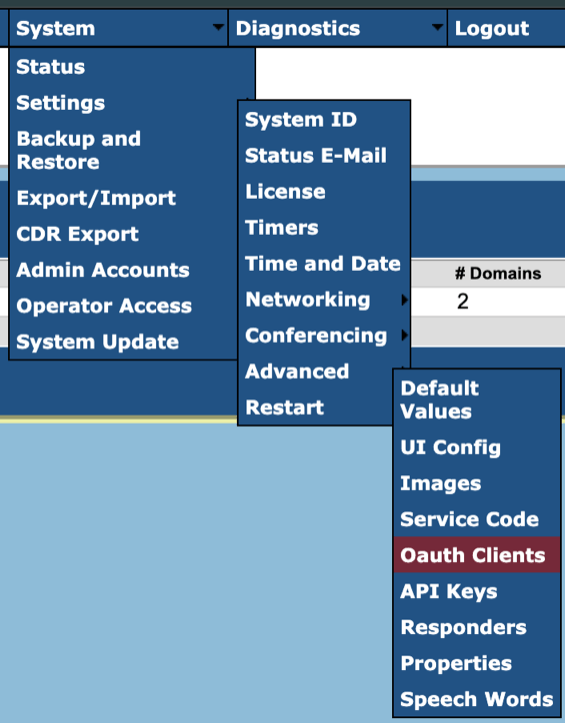
Go to System > Settings > Advanced > OAuth Clients.
-
Click Add in the bottom-left corner.
-
Enter a name, for example
acrobits_integration, then click Create.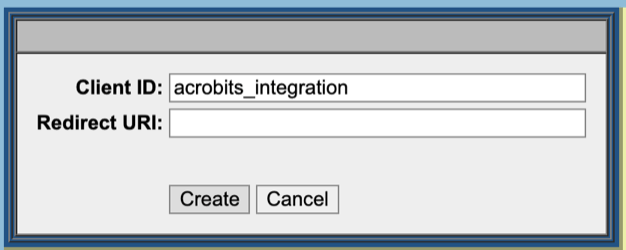
-
Open the new client entry and copy the Client ID and Client Secret.
Messaging Integration
To add messaging support, enable Cloud Softphone Linkup Messaging for your NetSapiens integration. Messages sent in Cloud Softphone are synchronized to NetSapiens, and messages sent or received on the NetSapiens side are synchronized back to Cloud Softphone. The integration also enables SMS through your NetSapiens SMS integration.
Messaging support requires the NetSapiens Subscription Manager script. The script creates and maintains SIP domain-level messaging event subscriptions, which allow the NetSapiens platform to notify Acrobits about message-history changes.
The script can run either on customer-managed infrastructure or on Acrobits-managed infrastructure, depending on your preference. For messaging synchronization, api-us.messaging.acrobits.cz must be able to reach your primary core hostname. For Acrobits-hosted deployment, Acrobits infrastructure must also be able to reach your primary core hostname.
The script reuses the basic integration values above: Client ID, Client Secret, NetSapiens portal URL, and primary core hostname. When configuring the script, provide the primary core hostname in URL form, for example https://core1.my.ucaas.tech.
In addition, prepare the following messaging-specific values:
| Property | Description |
|---|---|
| NetSapiens super-user credentials | Username and password with super-user level access to your NetSapiens instance. These credentials are used locally by the NetSapiens Subscription Manager script and are not sent to Acrobits. |
| Acrobits Callback Password | Unique password provided by your Acrobits representative to authorize reporting and synchronization requests from the script to Acrobits. |
| Cloud ID | Cloud ID identifier provided by your Acrobits representative. |
Set up the script by following NetSapiens Subscription Manager Script Setup.
Next Step
For the basic integration, share the Client ID, Client Secret, NetSapiens portal URL, and primary core hostname with your Acrobits representative.
If you are enabling messaging, also prepare the messaging-only properties listed above and deploy the NetSapiens Subscription Manager script by following NetSapiens Subscription Manager Script Setup.
Please also provide two NetSapiens portal test accounts for Acrobits, ideally on a dedicated Acrobits test domain, or otherwise on any testing or non-production domain. These accounts will help us validate the integration.